

Edge-Cloud Robotics: What Runs on the Robot vs the Cloud
Edge-cloud robotics explained: split robot software by deadline, bandwidth and privacy, plan for network outages, and try a latency planner and FedAvg demo.
Think of a cricket match at the Holkar Stadium. The fielder at point has a fraction of a second to stop a cut shot, so he never waits for instructions.
Between overs, the captain moves the field based on what he sees. After the match, the analyst at the team hotel studies hours of video and plans for the next game.
Three people, three time scales, three places. Nobody would ask the hotel analyst to decide whether the fielder should dive.
What is edge-cloud robotics?
Map the match onto a robot. The fielder's reflex is the robot's onboard control and safety loop. The captain on the field is an edge server: a computer in the same building or at the mobile operator's site, a few milliseconds away.
The hotel analyst is the cloud: huge compute, but far away and only reachable over a network you do not control.
Edge-cloud robotics is an architecture in which a robot's computation is divided across onboard processors, nearby edge servers and remote cloud services, with each task placed according to its latency deadline, bandwidth, compute needs and privacy requirements.
This is also called the edge-cloud continuum, because there is no sharp line between the tiers. The earlier articles in this series covered what runs on the robot: TinyML explained, edge AI hardware and model quantisation for the edge. This one decides what should run where.
The four tiers of the edge-cloud continuum
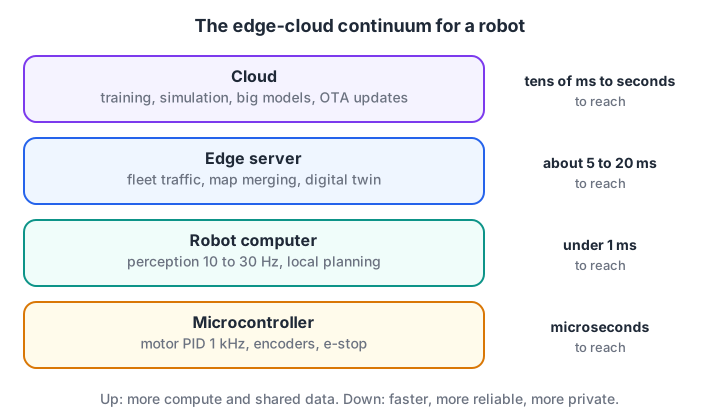
Moving up a tier buys compute and shared context; it costs latency, bandwidth and dependence on the network.
| Tier | Typical hardware | Typical jobs | Latency to reach it |
|---|---|---|---|
| Microcontroller on the robot | Arduino, ESP32, motor driver MCU | Motor PID at 1 kHz, encoder counting, bump and e-stop handling | Microseconds |
| Robot computer | Raspberry Pi, Jetson | Perception at 10 to 30 Hz, local planning, ROS 2 nodes | Under a millisecond (same robot) |
| Edge server | A PC or GPU server on site, or a 5G operator edge | Fleet traffic control, map merging, heavier detection, digital twin | About 5 to 20 ms on a good local network |
| Cloud | Data-centre GPUs and storage | Training, simulation, analytics, large language or vision-language models, software updates | Tens of milliseconds to seconds, sometimes unreachable |
How do you decide what runs on the robot?
Every task has a deadline: the time by which its answer is useless. A motor loop running at 1 kHz has 1 ms. Stopping for a person has maybe 50 ms. Deciding which room to tidy next can take seconds.
Compare the deadline with the time each tier needs, including the network. The key is to judge the network by its tail latency, the p99 or p99.9 value, because a robot that works on average but freezes once a minute is not safe.
import numpy as np
rng = np.random.default_rng(42)
# Simulated round-trip times to a cloud region over 4G/Wi-Fi, in ms
rtt = rng.lognormal(mean=np.log(70), sigma=0.45, size=10000)
rtt[rng.random(10000) < 0.005] = 2000         # 0.5% of requests stall or time out
p50, p99, p999 = np.percentile(rtt, [50, 99, 99.9])
print(f"network RTT p50 {p50:.0f} ms, p99 {p99:.0f} ms, p99.9 {p999:.0f} ms")

tasks = [  # name, deadline ms, onboard inference ms, cloud inference ms
    ("motor speed loop", 1, 0.05, 0.05),
    ("emergency stop on person", 50, 18, 4),
    ("object detection for grasping", 150, 60, 8),
    ("ask a big model what to tidy", 3000, 4000, 400),
    ("merge maps from 10 robots", 60000, float("inf"), 900),
]
for name, deadline, edge_ms, cloud_ms in tasks:
    edge_ok = edge_ms <= deadline
    cloud_ok = cloud_ms + p99 <= deadline     # judge the cloud by its bad days
    where = ("edge" if edge_ok and not cloud_ok else "cloud" if cloud_ok and not edge_ok
             else "either: prefer edge" if edge_ok else "redesign")
    print(f"{name:30s} deadline {deadline:>6.0f} ms -> {where}")
The median round trip looks fine at 70 ms. But one request in a hundred takes over 230 ms, and one in a thousand stalls for two seconds. That is why the person-stop and the grasping detector stay on board even though the cloud GPU is several times faster.
The big model (the kind of robot foundation model covered in embodied AI explained) and the fleet map merge go to the cloud, because they need compute or shared data the robot does not have, and their deadlines can absorb a slow reply.
The decision rules come down to five steps:
- List each task with its rate, deadline and input size.
- Keep on board anything safety-related or inside a control loop.
- Measure onboard inference time on the real board.
- Measure the network p99 and outage rate in the real building, not at your desk.
- Offload only tasks whose deadline survives the worst case, and give each one a local fallback.
Quick check
A cloud model is 5× faster than the robot's onboard model. Why might the onboard model still be the right choice for collision avoidance?
Safety tasks must meet their deadline every time, so the worst-case network delay decides, not the average.
Bandwidth and cost: send results, not raw data
Bandwidth is the second reason to compute at the edge. A single camera stream is small; twenty robots streaming all day is not. The cheapest byte is the one you never send.
# Monthly data and cost for a fleet: stream video vs send results (assumed prices)
robots, hours_per_day, days = 20, 10, 30
cost_per_gb = 8.0             # assumed mobile/cloud data cost in rupees per GB
gpu_hour = 90.0               # assumed cloud GPU price in rupees per hour

seconds = hours_per_day * 3600 * days
options = {   # name: (bytes per second per robot, cloud GPU hours per robot-hour)
    "stream 720p video (2 Mbit/s)": (2e6 / 8, 0.25),
    "send detections (300 B at 10 Hz)": (300 * 10, 0.0),
    "detections + 20 event clips/day": (300 * 10 + 20 * 5e6 / (hours_per_day * 3600), 0.0),
}
for name, (bps, gpu_share) in options.items():
    gb = bps * seconds * robots / 1e9
    gpu_cost = gpu_share * hours_per_day * days * robots * gpu_hour
    total = gb * cost_per_gb + gpu_cost
    print(f"{name:34s} {gb:9.1f} GB/month   approx Rs {total:10,.0f}")
Streaming video from the whole fleet moves about 5.4 TB a month and needs cloud GPUs to process it. Sending only detections cuts the traffic by about 80 times.
Adding a few short clips of interesting events, such as near-misses, keeps the data you need for retraining at a small extra cost. The prices in the demo are assumptions; plug in your own operator and cloud rates.
This is the same pattern the IoT basics article uses for sensors: process locally, report by exception, and publish compact messages, usually over a protocol such as MQTT.
What happens when the network drops?
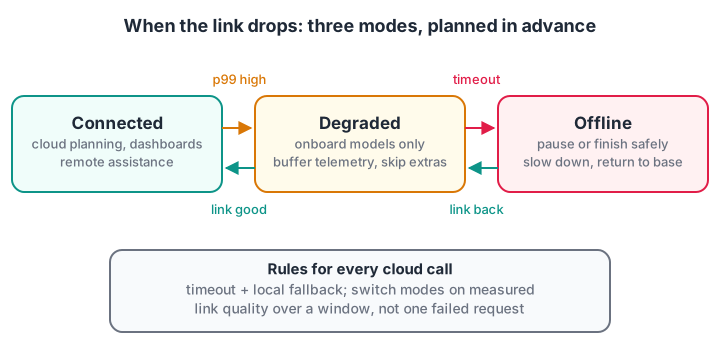
Design the offline behaviour first; the connected behaviour is the easy part.
A robot that depends on the cloud must know what to do without it. A common design has three modes:
- Connected. Cloud features work: big-model planning, live dashboards, remote assistance.
- Degraded. Latency or loss is high. The robot uses only onboard models, buffers telemetry for later upload and skips optional cloud calls.
- Offline. No link for longer than a set timeout. The robot finishes or pauses its task safely, slows down, or returns to base, and never waits forever on a request.
Each cloud call needs a timeout and a fallback, and the switch between modes should depend on measured link quality, not on a single failed request.
Privacy, security and federated learning
Robots carry cameras and microphones into homes, hospitals and factories, so the edge-cloud split is also a privacy decision. In India, the Digital Personal Data Protection Act, 2023 applies to personal data such as images of people, so collecting less is also easier to defend.
- Minimise data. Send "person at 2 m" rather than the frame. Blur faces before any image leaves the robot.
- Encrypt every link with TLS, and give each robot its own identity and credentials.
- Sign software updates and verify them on the robot before installing, so a compromised server cannot push malicious firmware.
- Least privilege. A robot should only be able to publish and read the data it needs.
Federated learning takes minimisation one step further: robots train on their own data and send only model updates to the server, which averages them. The demo below has three robots, each measuring wheel slip on its own floor at a different range of speeds.
import numpy as np
rng = np.random.default_rng(8)
# Each robot learns slip = w0 + w1 * speed on its own floor; data never leaves it
true_w = np.array([0.02, 0.15])
def robot_data(n, speed_range):
    v = rng.uniform(*speed_range, n)
    X = np.column_stack([np.ones(n), v])
    return X, X @ true_w + rng.normal(0, 0.02, n)

fleet = [robot_data(15, (0.1, 0.4)), robot_data(15, (0.3, 0.7)), robot_data(15, (0.6, 1.0))]
w_global = np.zeros(2)
for rnd in range(80):                                  # federated averaging rounds
    updates = []
    for X, y in fleet:
        w = w_global.copy()
        for _ in range(20):                            # local training on the robot
            w -= 0.5 * X.T @ (X @ w - y) / len(y)
        updates.append(w)
    w_global = np.mean(updates, axis=0)                # server averages weights only

X_test = np.column_stack([np.ones(5), np.linspace(0.1, 1.0, 5)])
local_only = np.linalg.lstsq(*fleet[0], rcond=None)[0]
for name, w in [("robot 1 alone", local_only), ("federated", w_global), ("true", true_w)]:
    print(f"{name:14s} w = {np.round(w, 3)}  slip at 1.0 m/s = {X_test[-1] @ w:.3f}")
Robot 1 only ever drove slowly, so its own model guesses badly at 1 m/s. The federated model, built from weight updates alone, lands almost on the true value. Real systems add secure aggregation and handle robots that drop out mid-round. The full method is explained in federated learning explained.
Quick check
In federated learning, what does each robot send to the server?
Raw data stays on the robot; the server only aggregates model updates.
Common edge-cloud mistakes
- Testing on office Wi-Fi. Measure latency and dropouts on the warehouse floor or in the field.
- Calling the cloud inside a control loop. One slow reply becomes a collision.
- No offline mode. A robot that freezes when the link drops is a safety risk.
- Streaming everything "for later". Storage and bandwidth bills grow faster than anyone looks at the data.
Key takeaways
- Place each task by deadline, data size, compute need and privacy: control and safety on board, heavy and fleet-wide work at the edge server or cloud.
- Judge the network by p99 and outages, not the median.
- Send results and selected event clips, not raw streams.
- Every cloud dependency needs a timeout, a fallback and a defined offline mode.
- Federated learning lets a fleet learn together while raw data stays on each robot.
FAQ
What is the difference between edge computing and cloud computing in robotics?
Edge computing runs tasks on the robot or on a server close to it, giving low and predictable latency without depending on the internet. Cloud computing runs tasks in remote data centres with far more compute and storage, at the cost of latency and network dependence. Most real robots use both.
Can a robot work without an internet connection?
A well-designed robot can. Its control loops, safety checks and core perception run on board, so it keeps working or stops safely when offline. Cloud features such as big-model planning, dashboards and updates simply pause until the link returns.
What is fog computing?
Fog computing is an older name for the middle tier between devices and the cloud: gateways, on-site servers and network equipment that process data close to where it is produced. In robotics it overlaps heavily with what is now usually called edge computing or the edge-cloud continuum.
Does 5G make cloud robotics possible for real-time control?
5G can bring latency down to a few milliseconds when the compute sits at the operator's edge, which helps fleet coordination and heavier perception. It does not remove outages or coverage gaps, so safety-critical loops should still run on the robot itself.
Where can I learn to build connected robots in Indore?
Debugshala's project-based course at Old Palasia covers the robot side of this architecture: ESP32 Wi-Fi and Bluetooth, sensors, motors, Raspberry Pi with a camera and ROS 2 basics. Explore robotics classes covering ESP32 Wi-Fi and ROS 2 at Debugshala, which accept fresh graduates and non-IT learners, and warm up with reasoning and coding tests on Debugshala Test.
From the team behind this site
Go further with the Robotics Course at Debugshala
These tutorials are written by Debugshala, a training and placement institute at Old Palasia, Indore. The classroom course adds live mentoring, real projects and interview preparation.
- Offline classes at Old Palasia, Indore
- Free demo class before you pay
- Non-IT, fresher and year-gap friendly
- Placement assistance
700+ students placed · 200+ hiring partners · 4.9★ Google rating
