

MQTT Protocol Explained: Topics, QoS and Python Examples
MQTT protocol explained for robots: brokers, topics and wildcards, QoS 0, 1 and 2, retained messages and Last Will, with a Python mini broker and ESP32 code.
Imagine the notice board outside a college department in Indore. The exam cell pins up timetables, the placement office pins up company visits, and the sports teacher pins up match results. Students don't phone each office. They walk past the boards they care about, and the newest notice under each heading stays up for anyone who comes later.
If the placement officer goes on leave without warning, the peon pins a note: "Placement office closed until further notice".
That board is how MQTT works.
What is MQTT?
Map the board onto MQTT. The notice board is the broker, a server that receives and forwards messages. Each heading (Exam cell, Placements, Sports) is a topic. Offices pinning notices are publishers, and students reading certain headings are subscribers. The newest notice that stays up is a retained message, and the peon's note is the Last Will and Testament.
MQTT (Message Queuing Telemetry Transport) is an open, lightweight publish/subscribe messaging protocol, standardised by OASIS, in which clients publish messages to topics on a broker and the broker delivers them to all clients subscribed to matching topics.
MQTT runs over TCP, usually on port 1883, or 8883 with TLS. Its fixed header can be as small as 2 bytes, which is why it suits microcontrollers, weak mobile links and battery devices. The two versions in use are 3.1.1 (2014) and 5.0 (2019). As the IoT basics article explained, it is the most common application protocol for telemetry.
Why publish/subscribe instead of HTTP?
With HTTP, a dashboard must keep asking each robot "anything new?". With MQTT, robots and dashboards never talk directly. Each opens one long-lived connection to the broker, and messages are pushed the moment they exist. Publishers don't need to know who is listening, so you can add a logger, a phone app or an alert service without touching robot code.
How do MQTT topics and wildcards work?
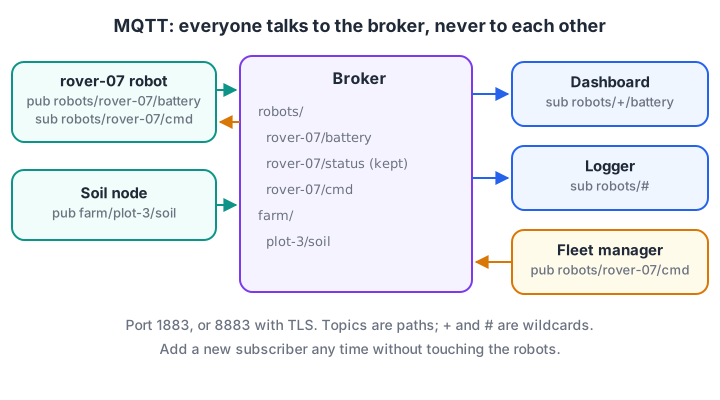
Publishers and subscribers only know topic names, never each other's addresses.
A topic is a UTF-8 string with levels separated by /, such as robots/rover-07/battery. Two wildcards are allowed in subscriptions, never in publishes:
+matches exactly one level.robots/+/batterymatchesrobots/rover-07/batteryandrobots/arm-02/battery.#matches all remaining levels and must be last.robots/#matches everything underrobots, includingrobotsitself.
Topics starting with $, such as the broker's $SYS/... statistics, are not matched by a leading wildcard. The mini broker below implements these rules plus retained messages.
def matches(sub, topic):                   # + = one level, # = all remaining levels
    s, t = sub.split("/"), topic.split("/")
    if topic.startswith("$") and s[0] in ("+", "#"):
        return False                       # wildcards never match $SYS-style topics
    for i, part in enumerate(s):
        if part == "#": return True
        if i >= len(t) or (part != "+" and part != t[i]):
            return False
    return len(s) == len(t)
class Broker:
    def __init__(self):
        self.subs, self.retained = [], {}
    def subscribe(self, name, topic_filter):
        self.subs.append((name, topic_filter))
        for topic, payload in self.retained.items():   # new subscriber gets retained
            if matches(topic_filter, topic):
                print(f"  -> {name} gets retained {topic} = {payload}")
    def publish(self, topic, payload, retain=False):
        if retain: self.retained[topic] = payload
        for name, f in self.subs:
            if matches(f, topic):
                print(f"  -> {name} receives {topic} = {payload}")

b = Broker()
b.subscribe("dashboard", "robots/+/battery")
b.subscribe("logger", "robots/#")
print("publish battery:"); b.publish("robots/rover-07/battery", "7.6 V")
print("publish status (retained):"); b.publish("robots/rover-07/status", "online", retain=True)
print("late subscriber joins:"); b.subscribe("phone-app", "robots/+/status")
print("$SYS check:", matches("#", "$SYS/broker/uptime"), matches("robots/#", "robots"))
The late phone app still learns that rover-07 is online, because the status was published with the retain flag. Without it, a new subscriber would see nothing until the robot next reported.
Designing a topic tree
A clear tree saves pain later. A common pattern is <site>/<device-type>/<device-id>/<measurement>, for example indore-warehouse/robots/rover-07/battery.
- No leading slash.
/robots/xcreates an empty first level. - Put the device ID before the measurement, so
+can select all devices. - Separate telemetry, status and commands, for example
.../telemetry,.../statusand.../cmd, so access rules can differ. - Keep payloads small and versioned, such as compact JSON with a
"v": 1field.
Quick check
Which subscription receives both robots/rover-07/battery and robots/arm-02/battery but not robots/rover-07/motor/temp?
+ matches exactly one level, so robots/+/battery selects the battery topic of every robot; # would match everything below robots.
What are MQTT QoS levels?
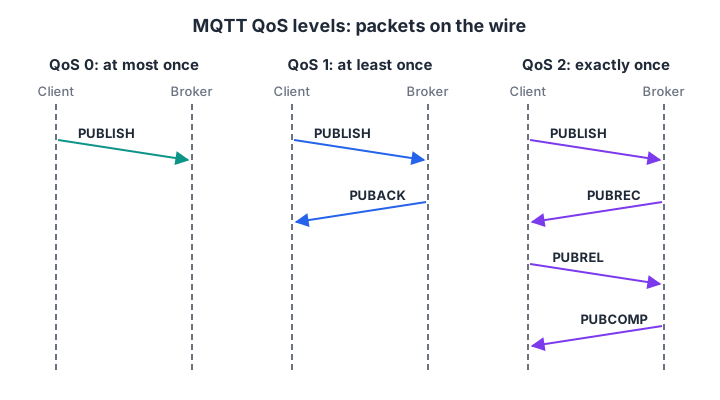
Each step up in QoS adds packets and round trips in exchange for stronger delivery guarantees.
Quality of Service is agreed separately for each hop (publisher to broker, broker to subscriber):
| QoS | Guarantee | Packets per message | Use for |
|---|---|---|---|
| 0 | At most once: may be lost | 1 | Frequent telemetry where the next reading replaces a lost one |
| 1 | At least once: may be duplicated | 2 or more | Commands and alerts, with handlers that tolerate repeats |
| 2 | Exactly once | 4 or more | Rare messages where duplicates are harmful, such as billing events |
The simulation shows what happens on a link that loses 10% of packets.
import numpy as np
rng = np.random.default_rng(1)
loss = 0.10                                  # 10% of packets lost on a weak Wi-Fi link
lost = lambda: rng.random() < loss

def send(qos, n=1000):
    delivered, packets = [], 0
    for msg in range(n):
        packets += 1                         # first PUBLISH
        if qos == 0:                         # fire and forget
            if not lost(): delivered.append(msg)
            continue
        stored = False
        while True:
            if lost():                       # PUBLISH lost: sender times out, resends
                packets += 1; continue
            if qos == 1 or not stored:       # QoS 2 broker remembers the packet id
                delivered.append(msg)
            stored = True
            packets += 1                     # PUBACK (QoS 1) or PUBREC (QoS 2)
            if not lost(): break             # acknowledgement arrived
            packets += 1                     # ack lost: sender resends PUBLISH (DUP flag)
        if qos == 2: packets += 2            # PUBREL + PUBCOMP complete the handshake
    return len(set(delivered)), len(delivered) - len(set(delivered)), packets

for qos in (0, 1, 2):
    ok, dup, pk = send(qos)
    print(f"QoS {qos}: delivered {ok:4d}/1000, duplicates {dup:3d}, packets {pk}")
QoS 0 loses about 9% of messages. QoS 1 delivers all of them, but when an acknowledgement is lost the sender resends, so the receiver sees over a hundred duplicates.
QoS 2 removes the duplicates at nearly twice the traffic of QoS 1. In robotics, QoS 1 with idempotent commands (sending "set speed to 0.3" twice is harmless; "increase speed by 0.1" is not) is the usual sweet spot.
Keepalive and Last Will: knowing when a robot disappears
When a client connects, it sets a keepalive interval. If the broker hears nothing, not even a ping, for one and a half times that interval, it treats the client as gone. If the client registered a Last Will and Testament at connect time, the broker then publishes it on the client's behalf.
keepalive = 10                    # seconds, agreed in CONNECT
will = ("robots/rover-07/status", "offline", True)     # topic, payload, retain
retained = {"robots/rover-07/status": "online"}

last_packet, dead_at = 0, 42      # robot's battery connector shakes loose at t = 42 s
for t in range(0, 90):
    alive = t < dead_at
    if alive and t % 5 == 0:      # telemetry every 5 s counts as activity
        last_packet = t
    # Broker rule: no packet for 1.5 x keepalive means the client is gone
    if t - last_packet > 1.5 * keepalive:
        topic, payload, retain = will
        if retain:
            retained[topic] = payload
        print(f"t={t:2d}s broker: no packet since t={last_packet}s -> publish will "
              f"{topic} = {payload!r}")
        break
print("retained status a new dashboard will see:", retained["robots/rover-07/status"])
Combine the Will with retain, and every dashboard, including one opened tomorrow, sees "offline" for a robot that lost power, without any custom heartbeat code. The robot publishes a retained "online" each time it reconnects.
Quick check
A robot loses power suddenly. How does a dashboard learn it is offline?
The Will is registered at connect time and published by the broker when the client disappears without a clean disconnect.
MQTT clients in Python and on an ESP32
Python with paho-mqtt
The Eclipse paho-mqtt library is the standard Python client. Version 2.x requires you to choose a callback API version; VERSION2 is the recommended one and gives MQTT 5 reason codes and properties. This needs a broker and network, so it has no Run button.
import json, time
import paho.mqtt.client as mqtt     # pip install "paho-mqtt>=2.0"

def on_connect(client, userdata, flags, reason_code, properties):
    if reason_code.is_failure:
        print("connect failed:", reason_code)
        return
    client.subscribe("robots/rover-07/cmd", qos=1)      # re-subscribed on reconnect

def on_message(client, userdata, msg):
    print("command:", msg.topic, msg.payload.decode())

client = mqtt.Client(mqtt.CallbackAPIVersion.VERSION2, client_id="rover-07",
                     protocol=mqtt.MQTTv5)
client.username_pw_set("rover-07", "use-a-real-secret")
client.tls_set()                                         # system CA certificates
client.will_set("robots/rover-07/status", "offline", qos=1, retain=True)
client.on_connect, client.on_message = on_connect, on_message

client.connect("broker.example.com", 8883, keepalive=10)
client.loop_start()                                      # network loop in a thread
client.publish("robots/rover-07/status", "online", qos=1, retain=True)
while True:
    reading = {"v": 1, "battery": 7.6, "x": 3.2, "y": 1.1}
    client.publish("robots/rover-07/telemetry", json.dumps(reading), qos=0)
    time.sleep(1)
For quick tests, the Mosquitto command-line tools are handy. Mosquitto 2.x listens only on localhost until you add a listener and authentication to its config file; version 2.1 was released in January 2026.
mosquitto_sub -h localhost -t 'robots/+/telemetry' -v          # watch all robots
mosquitto_pub -h localhost -t 'robots/rover-07/cmd' -q 1 -m '{"speed": 0.3}'
An ESP32 robot with PubSubClient
On an ESP32 with the Arduino core, the widely used PubSubClient library gives a compact client. This sketch registers a Will, publishes telemetry and reacts to commands. Its Wi-Fi setup matches the ESP32 Wi-Fi robot project.
#include <WiFi.h>
#include <PubSubClient.h>

WiFiClient net;
PubSubClient mqtt(net);
unsigned long lastSend = 0;

void onCommand(char* topic, byte* payload, unsigned int len) {
  String cmd;
  for (unsigned int i = 0; i < len; i++) cmd += (char)payload[i];   // not null-terminated
  if (cmd == "stop") { /* set both motor PWM values to 0 */ }
}

void connectMqtt() {
  while (!mqtt.connected()) {
    // id, user, pass, willTopic, willQos, willRetain, willMessage
    if (mqtt.connect("rover-07", "rover-07", "secret",
                     "robots/rover-07/status", 1, true, "offline")) {
      mqtt.publish("robots/rover-07/status", "online", true);
      mqtt.subscribe("robots/rover-07/cmd");
    } else {
      delay(2000);
    }
  }
}

void setup() {
  WiFi.begin("lab-wifi", "password");
  while (WiFi.status() != WL_CONNECTED) delay(200);
  mqtt.setServer("192.168.1.20", 1883);
  mqtt.setCallback(onCommand);
}

void loop() {
  connectMqtt();
  mqtt.loop();                                  // must run often
  if (millis() - lastSend > 1000) {
    lastSend = millis();
    String msg = "{\"battery\":" + String(analogRead(35) * 0.0021, 2) + "}";
    mqtt.publish("robots/rover-07/telemetry", msg.c_str());
  }
}
What is new in MQTT 5?
MQTT 5.0 keeps the same model and adds features that matter for fleets:
- Reason codes on every acknowledgement, so clients learn why something failed.
- Message and session expiry, so stale commands are dropped instead of delivered hours late.
- Shared subscriptions (
$share/group/topic) to spread messages across several worker processes. - User properties and response topics for metadata and request/response patterns.
- Topic aliases that replace long topic strings with small numbers to save bytes.
For security, always use TLS on port 8883 outside a lab, give each robot its own credentials, and configure per-topic access rules so a robot can only publish its own telemetry. These are the same principles as in edge-cloud robotics.
Common MQTT mistakes
- Using QoS 2 for everything. It doubles traffic for little benefit on telemetry.
- Non-idempotent commands with QoS 1. Duplicates will happen; design commands so repeats are safe.
- Duplicate client IDs. Two clients with the same ID keep kicking each other off the broker.
- Forgetting
loop(). Without the network loop, nothing is sent, received or kept alive.
Key takeaways
- MQTT is a lightweight publish/subscribe protocol: clients talk only to a broker through named topics.
+matches one topic level and#matches all remaining levels, in subscriptions only.- QoS 0, 1 and 2 trade traffic for delivery guarantees; QoS 1 with idempotent commands suits most robots.
- Retained messages and Last Will together give reliable online/offline status.
- Use TLS, unique client IDs and per-topic permissions in any real deployment.
FAQ
What is MQTT used for?
MQTT is used to move small, frequent messages between devices and servers: sensor telemetry, robot status, commands, alerts and smart-home events. It is popular in IoT, industrial monitoring, vehicles and robot fleets because it is lightweight, works over unreliable networks and lets many subscribers receive the same data.
What is an MQTT broker?
An MQTT broker is the server that accepts client connections, receives published messages and forwards them to subscribers of matching topics. It also stores retained messages, keeps sessions for offline clients and enforces authentication. Eclipse Mosquitto is a popular open-source broker; cloud IoT platforms offer managed ones.
Is MQTT better than HTTP for IoT?
For continuous telemetry and commands, usually yes. MQTT keeps one connection open, pushes messages instantly and has tiny headers, while HTTP needs a request for each exchange and polling for updates. HTTP remains simpler for occasional uploads, firmware downloads and integrating with web APIs.
Can ROS 2 and MQTT work together?
Yes. ROS 2 handles communication inside the robot, and MQTT is often used between robots and the cloud or dashboards. A bridge node subscribes to selected ROS 2 topics and republishes them over MQTT, and the reverse for commands. See ROS 2 basics for the robot side.
Where can I practise MQTT and ESP32 projects in Indore?
Debugshala's robotics course at the Old Palasia campus teaches ESP32 Wi-Fi and Bluetooth, sensors and motor control through projects, alongside Raspberry Pi and ROS 2 basics. Have a look at Debugshala's ESP32-to-ROS 2 robotics curriculum and book a free demo class, or check your fundamentals with quick MCQs on Debugshala Test.
From the team behind this site
Go further with the Robotics Course at Debugshala
These tutorials are written by Debugshala, a training and placement institute at Old Palasia, Indore. The classroom course adds live mentoring, real projects and interview preparation.
- Offline classes at Old Palasia, Indore
- Free demo class before you pay
- Non-IT, fresher and year-gap friendly
- Placement assistance
700+ students placed · 200+ hiring partners · 4.9★ Google rating
