

TinyML Explained: Machine Learning on Microcontrollers
TinyML explained: how ML models run on microcontrollers, with a battery budget, a numpy vibration anomaly classifier and LiteRT for Microcontrollers code.
Picture a soybean farmer near Dewas with a water pump at the edge of his field. Twice a season the pump's bearing wears out, and he only finds out when the motor seizes and the crop goes thirsty for three days.
He could fix a vibration sensor to the pump and stream every reading to a server. That means a SIM card, a data plan and a battery that dies in a week. Or the sensor board could listen to the pump itself, decide "normal" or "bearing going bad", and send one short SMS-sized message only when something is wrong.
The second option is TinyML.
What is TinyML?
Map the pump story onto the terms. The sensor board is a microcontroller (MCU), the same class of chip as an Arduino or ESP32. Its habit of listening and judging locally is on-device inference. The short alert is the only data that leaves, and the months of battery life come from the chip sleeping most of the time.
TinyML is the practice of running trained machine learning models on microcontrollers and other milliwatt-scale devices, so that sensor data is interpreted where it is collected, continuously and on battery power.
TinyML is the smallest end of the field covered in edge AI explained. A Raspberry Pi with a camera is edge AI; a coin-sized board that recognises a spoken word with 256 KB of RAM is TinyML.
Why not just send data to the cloud?
- Power. A transmitting radio uses far more energy than a CPU doing a few thousand multiplications.
- Cost. A microcontroller costs a fraction of a single-board computer, with no data bill for raw streams.
- Latency. A wake word or fall detector must react in tens of milliseconds, network or not.
- Privacy. Audio and motion data stay on the device; only the label leaves.
Quick check
In a battery-powered TinyML sensor, what usually uses the most energy?
Radio bursts draw far more current than a short inference, so deciding locally and transmitting rarely is what extends battery life.
How does a TinyML model get onto a microcontroller?
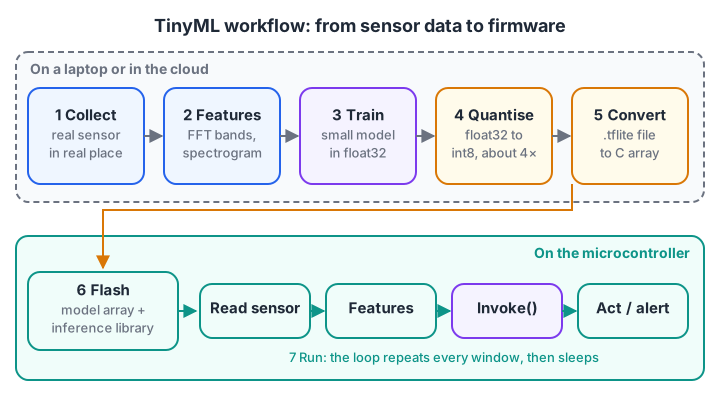
Training happens on a laptop or in the cloud; only the final, quantised model is compiled into the microcontroller's firmware.
The workflow has seven steps, and only the last two happen on the chip:
- Collect data from the real sensor in the real place: the pump's vibration at different loads, or 1-second audio clips of the wake word in a noisy room.
- Extract features. Raw samples are turned into something compact, such as frequency bands from an FFT for vibration or a spectrogram for audio.
- Train a small model on a laptop: a few dense layers or a tiny convolutional network.
- Quantise weights and activations from 32-bit floats to 8-bit integers, which cuts size by about 4×. Model quantisation for the edge goes through the maths.
- Convert the model to a LiteRT
.tfliteflatbuffer, then to a C byte array (for example withxxd -i). - Flash the array into the firmware along with the inference library.
- Run inference in the main loop: read sensor, compute features, invoke model, act on the result.
The memory budget: flash versus RAM
A microcontroller has two kinds of memory, and TinyML must respect both.
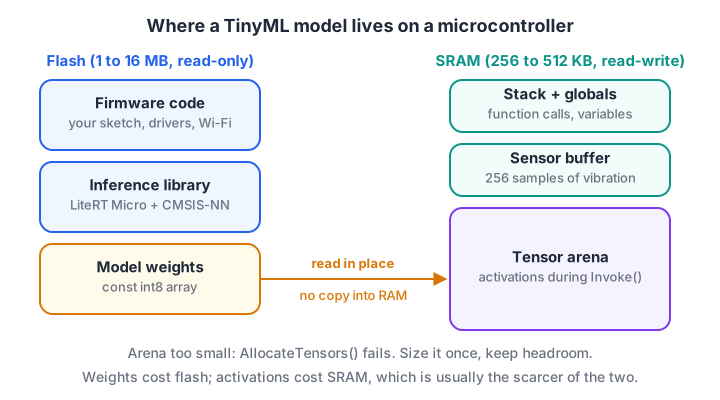
Weights live in flash and are read in place; only activations and buffers need scarce SRAM.
Flash (often 1 to 16 MB) holds the program and the model weights. SRAM (often 256 to 512 KB) holds everything that changes at run time: the stack, your sensor buffer and the tensor arena, a fixed block of memory where the inference library keeps intermediate activations.
If the arena is too small, the model simply refuses to start, so you size it once during development and leave headroom.
Quick check
Where are a TinyML model's weights usually stored on a microcontroller?
Weights are read-only, so they stay in flash. SRAM is kept for the tensor arena, buffers and the stack.
How long will a TinyML device run on a battery?
Battery life is mostly arithmetic. The key is the duty cycle: the chip wakes, samples, infers, maybe transmits, then sleeps. The average current, not the peak, decides battery life.
This calculator compares three designs for the pump monitor on a 2,000 mAh pack. The current figures are typical orders of magnitude for an ESP32-class board; measure your own board with a multimeter or power profiler before trusting them.
# Battery budget for a duty-cycled TinyML sensor (all currents in mA)
battery_mah = 2000
sleep_ma = 0.01          # deep sleep, about 10 microamps
active_ma = 40           # CPU awake: sampling and running the model
radio_ma = 180           # Wi-Fi transmit burst

def battery_days(active_s, radio_s, period_s):
    sleep_s = period_s - active_s - radio_s
    avg_ma = (active_ma * active_s + radio_ma * radio_s + sleep_ma * sleep_s) / period_s
    return avg_ma, battery_mah / avg_ma / 24

designs = {
    "stream raw data every 10 s": (0.5, 2.0, 10),
    "infer on device every 10 s": (0.5, 0.0, 10),
    "infer every 60 s, alert 1/day": (0.5, 2.0 / 8640, 60),
}
for name, (active, radio, period) in designs.items():
    avg, days = battery_days(active, radio, period)
    print(f"{name:32s} avg {avg:6.3f} mA -> {days:7.1f} days")
Streaming every reading lasts about two days. Running the model locally with the radio off stretches that to about 40 days, and waking once a minute reaches about eight months. The energy goes on the radio and on staying awake, not on the model.
A tiny anomaly classifier you can run
Now build the pump brain. A healthy pump vibrates mainly at its running frequency. A worn bearing adds energy at higher frequencies.
So the features are energy in 8 frequency bands from an FFT, and the model is a logistic regression with 9 numbers: 8 weights and a bias. The demo trains it with plain gradient descent, then quantises it to int8 to show the final size.
import numpy as np
rng = np.random.default_rng(7)
fs, n = 1000, 256                       # 1 kHz sampling, 256-sample windows
t = np.arange(n) / fs

def window(faulty):
    x = np.sin(2 * np.pi * 50 * t) + 0.3 * rng.normal(size=n)   # 50 Hz running speed
    bearing = 0.6 * np.sin(2 * np.pi * rng.uniform(180, 320) * t)  # bearing tone
    return x + bearing if faulty else x

def features(x):
    spec = np.abs(np.fft.rfft(x * np.hanning(n)))[1:129]
    return np.log1p(spec.reshape(8, 16).sum(axis=1))           # 8 band energies

y = rng.integers(0, 2, 600)
X = np.array([features(window(f)) for f in y])
Xs = (X - X[:400].mean(0)) / X[:400].std(0)

w, b = np.zeros(8), 0.0
for _ in range(300):                    # gradient descent on the first 400 windows
    p = 1 / (1 + np.exp(-(Xs[:400] @ w + b)))
    w -= 0.5 * Xs[:400].T @ (p - y[:400]) / 400
    b -= 0.5 * (p - y[:400]).mean()

acc = lambda W: (((Xs[400:] @ W + b) > 0) == y[400:]).mean()
scale = np.abs(w).max() / 127
w_q = np.round(w / scale).astype(np.int8)
print(f"test accuracy float32: {acc(w):.1%}, int8 weights: {acc(w_q * scale):.1%}")
print("int8 weights:", w_q)
print(f"model size: {w_q.nbytes} bytes of weights + 1 bias")
The classifier scores about 96% on held-out windows, and the int8 version gives exactly the same answers. Look at the weights: the first band, which holds the healthy 50 Hz tone, gets almost zero weight, while bands 3 to 6, where the bearing tone lands, get the largest. The model has learned the physics, in 8 bytes.
Real pumps are messier, so collecting data on the actual machine matters more than the model choice. For an unlabelled version of this problem, where you only have healthy data, see anomaly detection.
Running the model in C++ with LiteRT for Microcontrollers
Google's TensorFlow Lite for Microcontrollers is now called LiteRT for Microcontrollers, though the code and many headers still use the tflite name (the repository is tensorflow/tflite-micro).
It is written in C++17, needs no operating system and does no dynamic memory allocation, which is why it fits on bare-metal Cortex-M and ESP32 chips. The sketch below shows the standard pattern; it needs a real converted model, so treat it as a template.
#include "model_data.h"   // const unsigned char g_model[] from xxd -i
#include "tensorflow/lite/micro/micro_interpreter.h"
#include "tensorflow/lite/micro/micro_mutable_op_resolver.h"
#include "tensorflow/lite/schema/schema_generated.h"

constexpr int kArenaSize = 8 * 1024;          // tune: start big, then shrink
alignas(16) static uint8_t tensor_arena[kArenaSize];
static tflite::MicroInterpreter* interpreter;

void setup() {
  const tflite::Model* model = tflite::GetModel(g_model);
  static tflite::MicroMutableOpResolver<2> resolver;   // register only what you use
  resolver.AddFullyConnected();
  resolver.AddLogistic();
  static tflite::MicroInterpreter interp(model, resolver, tensor_arena, kArenaSize);
  interpreter = &interp;
  if (interpreter->AllocateTensors() != kTfLiteOk) { while (true) {} }
}

void loop() {
  float bands[8];
  read_vibration_bands(bands);                 // your FFT feature code
  TfLiteTensor* in = interpreter->input(0);
  for (int i = 0; i < 8; i++) {                 // quantise input with the model's scale
    in->data.int8[i] = (int8_t)(bands[i] / in->params.scale + in->params.zero_point);
  }
  interpreter->Invoke();
  TfLiteTensor* out = interpreter->output(0);
  float p_fault = (out->data.int8[0] - out->params.zero_point) * out->params.scale;
  if (p_fault > 0.8f) send_alert();            // radio wakes only now
  deep_sleep_seconds(60);
}
Registering only the operators you use keeps flash usage down. On Arm Cortex-M chips, the CMSIS-NN library supplies optimised int8 kernels that replace the reference code, often with a large speed-up.
Tools that save time
| Tool | What it does | When to reach for it |
|---|---|---|
| LiteRT for Microcontrollers | C++ inference library for .tflite models |
You want full control and already train in TensorFlow or Keras |
| Edge Impulse | Web platform for data collection, feature design, training and firmware export | Fast prototypes on many supported boards; acquired by Qualcomm (announced March 2025) |
| CMSIS-NN | Optimised neural network kernels for Cortex-M | Any int8 model on an Arm microcontroller |
| ESP-DL / ESP-NN | Espressif's libraries for ESP32 chips | Vision or audio models on ESP32-S3 |
Where TinyML is used today
- Predictive maintenance. Motors and pumps report "bearing wear likely" instead of raw vibration.
- Agriculture. Soil, leaf-wetness and insect-trap sensors classify conditions in fields with little network.
- Keyword spotting. A tiny always-on model hears the wake word, then wakes the big processor.
- Wearables. Fall detection, step counting and gesture recognition on wristbands.
- Robots. A microcontroller recognises voice commands or a tap gesture while a bigger computer handles vision, as the edge AI hardware guide explains.
Common TinyML mistakes
- Training on clean lab data. A model that has never heard a ceiling fan fails in a real room.
- Forgetting feature code costs too. Profile the whole loop, FFT included, not just
Invoke(). - Feeding floats to an int8 model. Quantise inputs with the model's own scale and zero point.
- Leaving the radio on. Most battery problems are radio problems, not model problems.
Key takeaways
- TinyML runs small, quantised models on microcontrollers so sensor data is judged where it is collected.
- Training happens on a laptop; the chip only runs inference inside its firmware loop.
- Weights go in flash; activations live in a fixed SRAM tensor arena.
- Battery life depends on duty cycle and radio use far more than on the model.
- LiteRT for Microcontrollers, CMSIS-NN and Edge Impulse are the common tools.
FAQ
Can an Arduino run machine learning?
Yes, if the board has a 32-bit processor and enough RAM. Boards based on Arm Cortex-M chips or the ESP32-S3 run small int8 models well. The classic 8-bit Arduino Uno, with 2 KB of RAM, is too limited for most TinyML libraries, which need a 32-bit platform.
What is the difference between TinyML and edge AI?
TinyML is a subset of edge AI. Edge AI covers any model running on a local device, from phones to GPU boards on robots. TinyML is the microcontroller end, with kilobytes of memory and milliwatts of power, where models must be tiny, quantised and compiled into firmware.
How big can a TinyML model be?
It depends on the chip, but typical models are 10 KB to a few hundred kilobytes of weights, with activations that fit in tens of kilobytes of RAM. Keyword-spotting models commonly fit in under 100 KB. Measure both flash and tensor-arena size for your exact model.
Do I need TensorFlow to do TinyML?
Not strictly. LiteRT for Microcontrollers runs .tflite models, usually made from TensorFlow or Keras, but Edge Impulse can train and export firmware for you, and some vendor tools import ONNX models. For learning the ideas, numpy demos are enough.
Can I learn TinyML and microcontrollers in Indore?
Yes. The Arduino, ESP32 and sensor skills TinyML builds on are taught in Debugshala's robotics course at Old Palasia, a project-based programme that also covers Python, Raspberry Pi vision and ROS 2 basics. It accepts fresh graduates and non-IT learners, and you can book a free demo class first. To check your basics, try the timed quizzes on Debugshala Test.
From the team behind this site
Go further with the Robotics Course at Debugshala
These tutorials are written by Debugshala, a training and placement institute at Old Palasia, Indore. The classroom course adds live mentoring, real projects and interview preparation.
- Offline classes at Old Palasia, Indore
- Free demo class before you pay
- Non-IT, fresher and year-gap friendly
- Placement assistance
700+ students placed · 200+ hiring partners · 4.9★ Google rating
