

What is Robotics? A Beginner's Guide to How Robots Work
What is robotics? Learn the sense–think–act loop, the five parts of every robot, robot types and uses, and run a Python robot loop simulation.
Picture yourself crossing the road outside Sarafa Bazaar on a busy evening. You look left and right, notice a scooter about ten metres away, judge that it is moving fast, and decide to wait. A second later you look again. The scooter has passed, the gap is clear, and you walk.
You did not make one big decision. You ran a tight loop: look, decide, move, then look again. If the scooter had suddenly slowed, your next look would have caught it and you would have changed your plan.
That loop is the whole secret of robotics. A robot does exactly what you did on that road, only with electronic eyes, a small computer for a brain and motors for legs.
What is robotics?
Map the road crossing onto a machine. Your eyes and ears become sensors: a distance sensor, a camera, a line sensor. Your brain becomes a controller, a small computer running a program. Your legs become actuators: motors and servos. The road and the scooter are the environment, which keeps changing while the robot works.
Robotics is the field of designing, building and programming machines that sense their environment, decide what to do, and physically act on it, usually in a repeating feedback loop.
The word "physically" matters. A chatbot can decide things, but it cannot pick up a box. A washing machine moves, but it follows a fixed timer and does not react to what it senses. A robot does both: it reads the world and changes the world, and each reading shapes the next action.
The sense–think–act loop
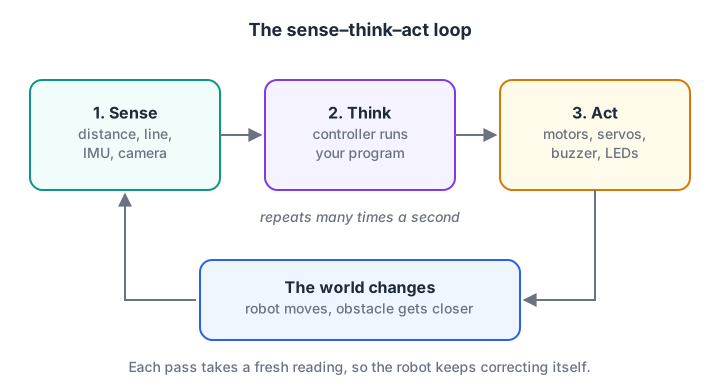
The robot never decides once and stops. Every action changes the world, and the next reading sees that change.
Sense. The robot reads its sensors. An ultrasonic sensor might report 82 cm to the nearest wall, an infrared sensor might say the floor below is dark, a gyroscope might report that the robot is turning at 15 degrees per second.
Think. The controller turns those numbers into a decision. This can be one if statement ("closer than 20 cm, so stop") or a full planning algorithm that builds a map. Either way, it is code.
Act. The controller sends commands to actuators. A motor driver spins the wheels at 60% speed, a servo turns a gripper to 90 degrees, a buzzer beeps.
Then the loop repeats. A simple hobby robot might run it 20 to 100 times a second; a drone's flight controller runs its inner loop far faster. The speed matters because the world does not wait. A robot moving at 50 cm per second that only checks its sensor once a second could travel half a metre blind.
Quick check
In the sense–think–act loop, which part makes the decision?
Sensors measure, actuators move; the controller's program turns readings into decisions.
The five parts of a robot
Open up almost any robot and you will find the same five building blocks.
- Sensors measure something about the robot or its surroundings: distance, light, colour, temperature, tilt, wheel rotation, sound or images. We cover the common ones in robot sensors and actuators.
- Controller runs the program. On small robots this is a microcontroller such as an Arduino or ESP32. On robots that need vision or heavier computing it is a single-board computer such as a Raspberry Pi, often working alongside a microcontroller. Arduino vs ESP32 vs Raspberry Pi compares them.
- Actuators create motion or output: DC motors for wheels, servos for precise angles, stepper motors for exact positioning, plus LEDs, buzzers and pumps.
- Power usually means a battery pack, plus regulators that give each part the voltage it needs. Motors are hungry and electrically noisy, so they usually get their own supply path through a motor driver.
- Chassis is the body: the frame, wheels, gears, brackets and mounts that hold everything in place and connect the robot to the floor.
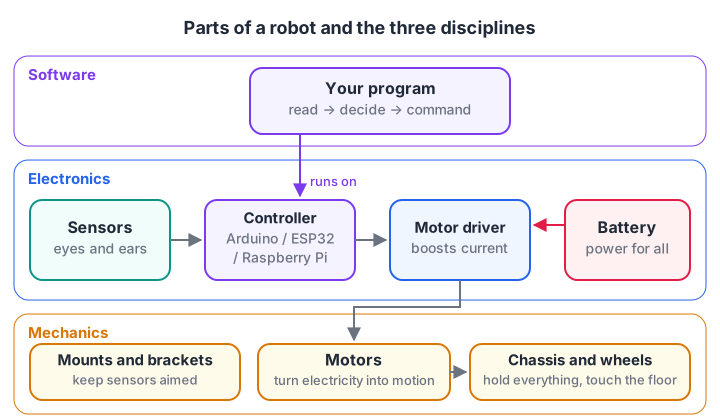
Software runs on the controller, the electronics move signals and power, and the mechanics turn motor rotation into useful motion.
How software, electronics and mechanics fit together
Robotics is often called a multidisciplinary field, which simply means three kinds of work have to agree with each other.
Mechanics decides what is physically possible. If the wheels slip on smooth tiles, or the chassis is so heavy that the motors stall, no amount of clever code will make the robot drive straight.
Electronics carries power and signals safely. A typical microcontroller pin can supply only a few tens of milliamps, while a small gear motor can draw several hundred. That is why you never connect a motor directly to a pin: a motor driver sits in between and switches the battery's current on the pin's instructions.
Software gives the robot its behaviour. It reads sensor values, filters out noise, makes decisions and sends commands at the right moment.
The three layers depend on each other in both directions. A noisy sensor (electronics) might need a filter (software). A wobbly mount (mechanics) might show up as noisy readings (electronics) and confuse the decision logic (software). Good robot builders learn to ask "which layer is this problem really in?" before they start changing code.
Quick check
Why should a DC motor not be wired directly to a microcontroller pin?
A pin supplies only a small current. A motor driver switches the battery's larger current instead.
Types of robots and where they are used
| Type | How it moves | Real uses |
|---|---|---|
| Wheeled mobile robots | Wheels or tracks on the ground | Warehouse carts, floor cleaners, delivery robots, hobby line followers |
| Robotic arms (manipulators) | Joints driven by motors | Welding and painting in car plants, pick-and-place in electronics assembly, packing |
| Aerial robots | Propellers | Crop spraying, surveying, inspection of towers and bridges |
| Legged robots | Two, four or more legs | Inspection on uneven ground, research |
| Collaborative robots ("cobots") | Arms designed to work near people | Small factories, assembly lines with mixed human and robot work |
| Humanoids and social robots | Varied | Research, reception and education, early trials in logistics |
Most beginners start with a wheeled robot because the mechanics are simple and the sense–think–act loop is easy to see. The same ideas carry over directly to arms and drones, which mostly add more sensors and more maths.
Simulate a sense–think–act loop in Python
You do not need hardware to understand the loop. The simulation below fakes an ultrasonic sensor by adding random noise to a "true" distance, decides on an action, and then updates the world based on that action. If you are new to Python, the for loop and if-else tutorials cover everything used here.
import random
random.seed(7)

distance = 120.0                     # true distance to the wall, in cm

for step in range(1, 13):
    # SENSE: a fake ultrasonic reading = truth + a little noise
    reading = distance + random.uniform(-3, 3)

    # THINK: choose an action from the reading
    if reading < 20:
        action, speed = "turn", 0
    elif reading < 50:
        action, speed = "slow", 8
    else:
        action, speed = "forward", 20

    # ACT: the action changes the world
    if action == "turn":
        distance = 150.0             # after turning, open space ahead
    else:
        distance -= speed            # cm moved during this loop

    print(f"step {step:2}: read {reading:6.1f} cm -> {action:7} | true distance now {distance:6.1f}")
Run it and watch the pattern. The robot drives fast while the wall is far, slows down once it is within 50 cm, turns when it gets closer than 20 cm, and then carries on in open space.
Notice that the readings never exactly match the true distance. Real sensors behave the same way, which is why robot code has to tolerate small errors.
Try changing the thresholds or the speeds. Set the fast speed to 60 and the robot skips the slow zone entirely and reaches the wall before it reacts: a real lesson about loop speed versus robot speed.
Common mistakes beginners make
- Powering motors from the controller board. This causes random resets, brown-outs and sometimes a dead board. Use a motor driver and a proper battery.
- Forgetting a common ground. If the battery, driver and controller do not share ground, signals have no reference and behave strangely.
- Trusting one sensor reading. A single spike can trigger a wrong turn. Average a few readings or check twice before acting.
- Blocking the loop. Long
delay()calls freeze sensing. While the code waits, the robot is driving blind. - Debugging the wrong layer. Before rewriting code, check wiring, battery voltage and loose mounts.
Key takeaways
- A robot senses, thinks and acts in a repeating loop, and each action changes what it senses next.
- The five parts are sensors, controller, actuators, power and chassis.
- Software, electronics and mechanics must all work; problems often hide in a different layer than they appear.
- Wheeled robots are the easiest place to learn, and the ideas transfer to arms and drones.
- You can understand and test robot logic in plain Python before building anything.
FAQ
Do I need to know coding before learning robotics?
It helps, but you can learn both together. Basic Python or C++ (variables, if statements and loops) is enough to program your first robot. Start with the first Python program tutorial, then solve beginner coding quizzes on Debugshala Test to build speed.
Is robotics only for mechanical or electronics engineers?
No. Many people who build robots come from computer science, science or even non-technical backgrounds. Each part of the field can be learned step by step, and most first projects use ready-made modules that plug together without soldering.
What is the difference between a robot and an automatic machine?
An automatic machine follows a fixed sequence, like a timer-based washing machine cycle. A robot uses sensors to react to its environment and changes its behaviour based on what it measures. The feedback loop is the key difference.
Can I learn robotics in Indore with hands-on projects?
Yes. Debugshala's robotics course in Indore is project-based and taught at its Old Palasia campus.
It covers Python for robotics, electronics basics and safe wiring, Arduino and ESP32, sensors, motors and motor drivers, line-follower and obstacle-avoiding robots, Raspberry Pi with a camera and ROS 2 basics, ending with a final robot project. You can attend a free demo class before paying anything.
From the team behind this site
Go further with the Robotics Course at Debugshala
These tutorials are written by Debugshala, a training and placement institute at Old Palasia, Indore. The classroom course adds live mentoring, real projects and interview preparation.
- Offline classes at Old Palasia, Indore
- Free demo class before you pay
- Non-IT, fresher and year-gap friendly
- Placement assistance
700+ students placed · 200+ hiring partners · 4.9★ Google rating
