

Robotics Programming Languages: C++, Python and What to Learn
Which robotics programming languages matter? See where C++, Python, MicroPython, ROS 2 and industrial robot languages run, with code and a learning path.
Think about how a train gets from Indore Junction to Ujjain. The loco pilot reacts in a fraction of a second: brake, throttle, horn. The station master watches a few kilometres of track and decides which train gets which platform. Far away, a planning office writes the timetable for the whole zone weeks in advance.
All three are "driving" the train, but at very different speeds and with very different tools. The pilot uses levers and reflexes. The station master uses signals and phone calls. The planners use spreadsheets and software.
Robot software is layered the same way, and each layer has a language that suits it.
What is a robotics programming language?
Map the railway onto a robot. The loco pilot is the firmware on a microcontroller, reading sensors and adjusting motors hundreds or thousands of times a second. The station master is the robot's main computer, coordinating sensors, maps and motion, often with ROS 2. The planning office is the AI and cloud layer that trains models and plans missions.
A robotics programming language is any language used to write the software that senses, decides and moves a robot, and in practice that means C and C++ for low-level, time-critical control, Python for high-level logic, vision and AI, plus specialised languages for industrial arms and PLCs.
There is no single "robot language". The useful question is which language belongs on which layer, and that depends on the hardware parts described in components of a robot. The board you pick narrows the choice further, as Arduino vs ESP32 vs Raspberry Pi shows.
The robot software stack: which language runs where
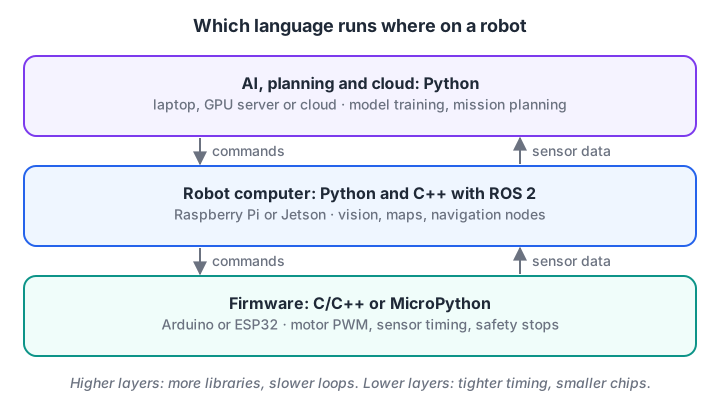
Lower layers need tight timing and run on small chips; upper layers need libraries and run on full computers.
| Language | Main layer | Typical hardware | Why it is used | Weak point |
|---|---|---|---|---|
| C / C++ | Firmware, drivers, fast control loops, ROS 2 nodes | Arduino, ESP32, STM32, robot computers | Compiled to machine code, predictable timing, tiny memory use | Longer to write, easier to crash with memory bugs |
| Python | High-level logic, vision, AI, scripting, ROS 2 nodes | Raspberry Pi, Jetson, laptops | Fast to write, huge libraries (NumPy, OpenCV, PyTorch) | Slower, timing can wobble |
| MicroPython | Simple firmware and prototypes | ESP32, Raspberry Pi Pico | Python syntax on a microcontroller | Slower than C++, fewer libraries |
| MATLAB / Simulink | Control design, simulation, research | Desktop, code generation for embedded chips | Strong maths and control toolboxes | Commercial licence, less used on hobby robots |
| Vendor robot languages (ABB RAPID, KUKA KRL, FANUC TP) | Industrial arm programs | Each brand's controller | Built-in motion commands and safety | Only works on that brand |
| PLC languages (Ladder Diagram, Structured Text) | Factory lines, conveyors, interlocks | PLCs from many makers | Standardised by IEC 61131-3, very reliable | Not for vision or AI |
| Rust | Firmware and systems code | Microcontrollers and computers | Memory safety without slowing down | Younger ecosystem in robotics |
C and C++ for real-time robot control
C++ is the language of Arduino sketches, most ROS 2 core libraries and most motor controller firmware. It compiles directly to machine code, so a loop that reads a sensor and updates a motor takes the same few microseconds every time. That predictability is what "real-time" really means: not fast, but on time.
Here is a small proportional controller for a two-sensor line follower. It reads two analog IR sensors, computes how far the robot is off the line, and slows one wheel to steer back.
// Line follower steering on an Arduino Uno with an L298N or TB6612FNG
const int LEFT_IR = A0, RIGHT_IR = A1;
const int LEFT_PWM = 5, RIGHT_PWM = 6;   // direction pins not shown
const int BASE = 150;                    // cruising speed, 0-255
const float KP = 0.25;

void setup() {
  pinMode(LEFT_PWM, OUTPUT);
  pinMode(RIGHT_PWM, OUTPUT);
}

void loop() {
  int left = analogRead(LEFT_IR);        // 0-1023, higher = darker
  int right = analogRead(RIGHT_IR);
  int error = left - right;              // positive: line is to the left
  int turn = (int)(KP * error);
  analogWrite(LEFT_PWM, constrain(BASE - turn, 0, 255));
  analogWrite(RIGHT_PWM, constrain(BASE + turn, 0, 255));
  delay(5);                              // about 200 updates per second
}
The constrain() calls keep PWM values inside 0 to 255, because on an Uno a value outside that range can wrap around and drive the motor at a strange speed. If you have read PID control explained, you will recognise this as the P part of a PID loop.
Python for logic, vision and AI
Python is an interpreted, general-purpose language, and in robotics it rules the upper layers. It is where OpenCV, NumPy, scikit-learn, PyTorch and rclpy live. It is also the fastest way to test an idea before you burn it into firmware.
The same steering logic in plain Python, with simulated sensor readings, runs right here in the browser:
BASE, KP = 150, 0.25

def clamp(v, lo=0, hi=255):
    return max(lo, min(hi, v))

def steer(left, right):
    error = left - right            # positive: line is under the left sensor
    turn = int(KP * error)
    return clamp(BASE - turn), clamp(BASE + turn)

# (left, right) readings as the robot drifts across a black line
readings = [(300, 310), (620, 280), (900, 150), (450, 460), (200, 760)]
for left, right in readings:
    lpwm, rpwm = steer(left, right)
    side = "left" if left > right + 50 else "right" if right > left + 50 else "centre"
    print(f"L={left:4} R={right:4}  line {side:<6}  PWM left={lpwm:3} right={rpwm:3}")
When the line drifts under the left sensor, the left wheel slows and the right wheel speeds up, turning the robot back towards the line. Writing it in Python first lets you check the logic with fake numbers before any wiring. If the def and for lines look new, start with Python for loops.
Python in ROS 2
ROS 2 offers two official client libraries: rclcpp for C++ and rclpy for Python. Nodes written in either language talk over the same topics, so you can write a camera node in Python and a motor control node in C++ on the same robot. The ROS 2 basics tutorial shows rclpy publishers and subscribers.
MicroPython: Python on a microcontroller
MicroPython is a small implementation of Python 3 that runs directly on chips such as the ESP32 and Raspberry Pi Pico. You get Python syntax and an interactive prompt over USB, at the cost of speed. The same steering logic on an ESP32 looks like this:
# MicroPython on an ESP32 (see docs.micropython.org for your board's pins)
from machine import Pin, PWM, ADC
import time

left_ir = ADC(Pin(34)); left_ir.atten(ADC.ATTN_11DB)    # full 0-3.3 V range
right_ir = ADC(Pin(35)); right_ir.atten(ADC.ATTN_11DB)
left_pwm = PWM(Pin(25), freq=1000)
right_pwm = PWM(Pin(26), freq=1000)
BASE, KP = 40000, 0.25                                  # duty out of 65535

def clamp(v):
    return max(0, min(65535, v))

while True:
    error = left_ir.read_u16() - right_ir.read_u16()
    turn = int(KP * error)
    left_pwm.duty_u16(clamp(BASE - turn))
    right_pwm.duty_u16(clamp(BASE + turn))
    time.sleep_ms(5)
Notice that the numbers changed: ESP32 analog readings and PWM duty here use a 16-bit range (0 to 65535) instead of the Uno's 10-bit input and 8-bit output. Moving code between boards is mostly about these ranges and pin numbers, not the logic.
Quick check
Two ROS 2 nodes on one robot are written in C++ and Python. Can they share a topic?
ROS 2 client libraries in different languages exchange the same typed messages over the same middleware.
Compiled vs interpreted: why timing matters
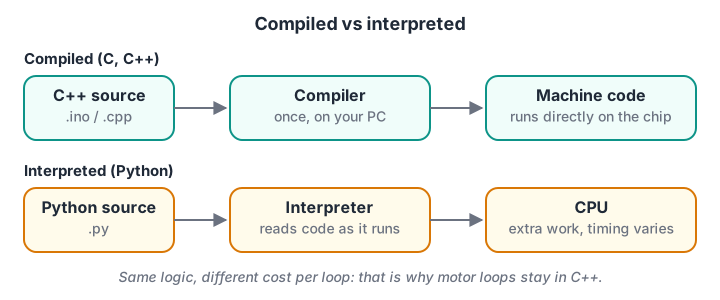
Compiled code does its translation once, before upload. Interpreted code translates as it runs, which is slower and less predictable.
A control loop has a time budget. At 100 updates per second, each pass must finish in under 10 milliseconds, every time. You can measure how much of that budget a Python function uses:
import time

def steer(left, right, base=150, kp=0.25):
    turn = int(kp * (left - right))
    return max(0, min(255, base - turn)), max(0, min(255, base + turn))

# Time batches of 200 calls: one call is too fast for some clocks (browsers round timers).
BATCH = 200
times = []
for b in range(100):
    t0 = time.perf_counter()
    for i in range(BATCH):
        steer(500 + (b * BATCH + i) % 300, 480)
    times.append((time.perf_counter() - t0) / BATCH)

times.sort()
budget_us = 10_000                       # 100 Hz loop = 10 ms per pass
median_us = max(times[len(times) // 2] * 1e6, 1e-3)
worst_us = max(times[-1] * 1e6, median_us)
print(f"median call: {median_us:.2f} us, worst batch average: {worst_us:.2f} us")
print(f"median uses {median_us / budget_us:.4%} of a 10 ms budget")
print(f"worst/median ratio: {worst_us / median_us:.1f}x (this spread is the jitter)")
On a laptop, Python easily fits a 10 ms budget for simple maths. The interesting number is the ratio between the slowest and the median batch: occasional slow stretches are normal in an interpreted language running on a full operating system, and on a microcontroller written in C++ that spread is far smaller.
A motor loop on a microcontroller in C++ does not have that spread, which is why the lowest layer stays in C++ even on robots whose "brain" is Python.
Quick check
Which layer of a robot is most likely to be written in C or C++?
Firmware needs predictable timing and low memory use, which compiled C and C++ provide.
Which robotics programming language should you learn first?
- Python basics. Variables, conditions, loops and functions. Robot logic is mostly these four things. Start at getting started with Python.
- Arduino C++.
setup(),loop(),digitalWrite,analogRead,analogWrite, and timing withmillis(). A few weeks of blinking LEDs and spinning motors goes a long way. - Python with NumPy and OpenCV on a Raspberry Pi, once you want cameras or data.
- ROS 2 with rclpy, then rclcpp when a node needs more speed.
- Specialised languages on demand: a vendor language when you join a company using that brand's arms, or ladder logic for factory automation.
Common mistakes when choosing a language
- Waiting to find the "best" language. Concepts transfer. A proportional controller looks the same in every language.
- Running motor timing from Python on a Raspberry Pi. Linux can pause your program at any moment. Let a microcontroller handle pulses and PWM.
- Ignoring board-specific ranges. 10-bit, 12-bit and 16-bit readings need different thresholds when you port code.
- Using
delay()everywhere in C++. Long delays freeze the loop and the robot stops sensing. Usemillis()timing instead. - Skipping the simulation step. Testing logic in Python with fake readings catches most bugs before you touch hardware.
Key takeaways
- Robots are programmed in layers, and each layer has a natural language.
- C and C++ run firmware and fast control because compiled code is small and predictable.
- Python runs logic, vision and AI because of its libraries and speed of development.
- MicroPython brings Python syntax to microcontrollers for simpler projects.
- Industrial arms and PLCs use their own languages, learned on the job.
- Start with Python, add Arduino C++, then ROS 2.
FAQ
Which programming language is best for robotics?
There is no single best language. C++ is best for firmware and time-critical control, and Python is best for high-level logic, computer vision and AI. Most working robots use both, often connected through ROS 2, so learning both is more useful than choosing one.
Is Python enough for robotics?
Python is enough to learn robotics, prototype ideas and build vision and AI features. For motors and sensors that need exact timing, you will still meet C++ on a microcontroller, at least at the level of Arduino sketches. Many robotics jobs list both Python and C++.
Is Arduino code C or C++?
Arduino sketches are C++. The Arduino environment adds a simplified structure with setup() and loop() and a library of functions such as digitalWrite() and analogRead(), then compiles everything with a standard C++ compiler for the board's chip.
Do industrial robots use Python?
The arm's own controller usually runs the maker's language, such as ABB RAPID or KUKA KRL. Python is widely used around them for vision, testing, data logging and talking to the controller, and collaborative robots increasingly offer Python interfaces.
Can I learn robotics programming in Indore without an IT background?
Yes. Robotics classes at Debugshala, Indore accept fresh graduates and non-IT learners and start with Python for robotics before moving to Arduino, ESP32, Raspberry Pi and ROS 2 basics. Classes are in English and Hindi, and a free demo class is available. You can also try Python coding questions on Debugshala Test before you start.
From the team behind this site
Go further with the Robotics Course at Debugshala
These tutorials are written by Debugshala, a training and placement institute at Old Palasia, Indore. The classroom course adds live mentoring, real projects and interview preparation.
- Offline classes at Old Palasia, Indore
- Free demo class before you pay
- Non-IT, fresher and year-gap friendly
- Placement assistance
700+ students placed · 200+ hiring partners · 4.9★ Google rating
