

ROS 2 Basics: Nodes, Topics, Services and Launch Files
ROS 2 basics for beginners: nodes, topics, publishers, subscribers, services, messages and launch files, with rclpy code, CLI commands and a Python demo.
Picture the kitchen of a busy thali restaurant on MG Road. One cook only makes rotis, another handles dal, a third does sabzi, and a runner carries plates out. Nobody walks over to tell each cook individually what is needed.
Instead, orders are called out loud, and whoever handles that dish picks it up. When the roti cook finishes a batch, he puts it on the pass, and anyone who needs rotis takes them.
If the dal cook is off sick, a replacement steps into the same role and nothing else in the kitchen changes. If the restaurant adds a dessert counter, it simply starts listening for dessert orders.
That kitchen is a good model of ROS 2. A robot built with ROS 2 is a team of small, specialised programs that share information through well-known channels instead of calling each other directly.
What is ROS 2?
Map the kitchen onto a robot. Each cook is a node, one program with one job: read the camera, detect obstacles, plan a path, drive the motors. The order calls and the pass are topics, named channels where data is put out and picked up.
A cook putting rotis on the pass is a publisher; anyone taking them is a subscriber. Asking the manager "can I have the stock count?" and waiting for the answer is a service. The recipe card format is a message type. And the opening checklist that gets every station running is a launch file.
ROS 2 is an open-source set of libraries and tools for building robot software as a network of independent nodes that exchange typed messages over topics, services and actions, with communication handled by a middleware layer based on DDS.
ROS 2 runs mainly on Ubuntu Linux, which is why robots that use it usually carry a Raspberry Pi or a larger computer rather than only a microcontroller; Arduino vs ESP32 vs Raspberry Pi explains why.
It is released in named distributions. Humble Hawksbill and Jazzy Jalisco are long-term support releases that many robots and courses use; check docs.ros.org for the current list before you install.
The ROS 2 graph: nodes, topics and services
All the nodes and the connections between them form the ROS graph. Here is a small one for a camera-based mobile robot.
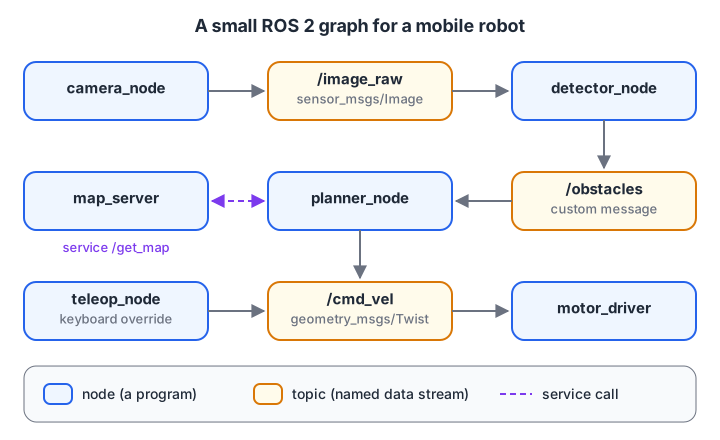
Data flows through named topics. Two nodes can publish to the same topic, and nodes never need to know who is on the other side.
Nodes
A node is a process (or part of one) with a single responsibility. Small nodes are easier to test, restart and reuse. The motor_driver node above works the same whether its commands come from the planner or from a person on a keyboard.
Seen through the sense–think–act loop from what is robotics, the camera node senses, the detector and planner think, and the motor driver acts.
Topics, publishers and subscribers
A topic is a named stream of messages such as /cmd_vel or /image_raw. Publishers send messages whenever they like; subscribers receive every message on that topic. This is many-to-many and asynchronous: the camera does not wait for the detector to finish before sending the next frame.
Messages
Every topic has one message type, defined in an interface file. geometry_msgs/msg/Twist, the standard velocity command, holds a linear vector and an angular vector, each with x, y and z. For a wheeled robot you normally set linear.x (forward speed in metres per second) and angular.z (turning speed in radians per second).
Services
A service is a request and a reply, like a function call between nodes: "give me the map", "enable the motors". Use topics for continuous data and services for occasional questions or commands that need an answer. For long jobs with progress updates, such as "drive to the kitchen", ROS 2 has a third pattern called actions.
Quick check
A camera node sends 30 images per second to whoever needs them. Which ROS 2 pattern fits?
Continuous streams of data go on topics. Services are for occasional request-and-reply calls.
Quick check
Which command shows the messages arriving on /cmd_vel?
ros2 topic echo subscribes to the topic and prints every message it receives.
Writing a publisher and subscriber with rclpy
rclpy is the Python client library for ROS 2. The examples follow the structure of the official ROS 2 tutorials and need a ROS 2 installation, so they are not runnable in the browser.
Publisher: send velocity commands
import rclpy
from rclpy.node import Node
from geometry_msgs.msg import Twist


class Driver(Node):

    def __init__(self):
        super().__init__('driver')
        self.publisher_ = self.create_publisher(Twist, 'cmd_vel', 10)
        self.timer = self.create_timer(0.5, self.timer_callback)   # every 0.5 s

    def timer_callback(self):
        msg = Twist()
        msg.linear.x = 0.2       # metres per second forward
        msg.angular.z = 0.0      # no turning
        self.publisher_.publish(msg)
        self.get_logger().info(f'Publishing linear.x={msg.linear.x}')


def main(args=None):
    rclpy.init(args=args)
    node = Driver()
    rclpy.spin(node)
    node.destroy_node()
    rclpy.shutdown()


if __name__ == '__main__':
    main()
The 10 in create_publisher is the queue depth of the default quality-of-service settings: up to ten messages are buffered if subscribers fall behind.
Subscriber: receive the commands
import rclpy
from rclpy.node import Node
from geometry_msgs.msg import Twist


class MotorListener(Node):

    def __init__(self):
        super().__init__('motor_listener')
        self.subscription = self.create_subscription(
            Twist, 'cmd_vel', self.listener_callback, 10)

    def listener_callback(self, msg):
        self.get_logger().info(
            f'Drive at {msg.linear.x:.2f} m/s, turn at {msg.angular.z:.2f} rad/s')


def main(args=None):
    rclpy.init(args=args)
    node = MotorListener()
    rclpy.spin(node)
    node.destroy_node()
    rclpy.shutdown()


if __name__ == '__main__':
    main()
rclpy.spin() keeps the node alive and calls listener_callback every time a message arrives. In a real robot, that callback would convert the velocities into PWM values for the motor driver, or send them over serial to a microcontroller.
A service server
This node offers an enable_motors service using the standard std_srvs/srv/SetBool type, whose request has a data boolean and whose response has success and message.
import rclpy
from rclpy.node import Node
from std_srvs.srv import SetBool


class MotorSwitch(Node):

    def __init__(self):
        super().__init__('motor_switch')
        self.enabled = False
        self.srv = self.create_service(SetBool, 'enable_motors', self.handle)

    def handle(self, request, response):
        self.enabled = request.data
        response.success = True
        response.message = 'motors on' if self.enabled else 'motors off'
        return response


def main(args=None):
    rclpy.init(args=args)
    rclpy.spin(MotorSwitch())
    rclpy.shutdown()


if __name__ == '__main__':
    main()
Launch files: starting the whole robot at once
A real robot may need ten nodes with parameters. Instead of opening ten terminals, you write a launch file. Python launch files define a generate_launch_description() function.
from launch import LaunchDescription
from launch_ros.actions import Node


def generate_launch_description():
    return LaunchDescription([
        Node(package='my_robot', executable='driver', name='driver'),
        Node(package='my_robot', executable='motor_listener', name='motor_listener',
             parameters=[{'max_speed': 0.3}]),
        Node(package='my_robot', executable='motor_switch', name='motor_switch'),
    ])
The executable names come from the console_scripts entry points in your package's setup.py, for example 'driver = my_robot.driver:main'.
ROS 2 command-line tools you will use daily
The ros2 command lets you inspect and poke a running graph without writing code. Replace jazzy with your installed distribution.
# Make ROS 2 available in this terminal
source /opt/ros/jazzy/setup.bash

# Try the built-in demo talker and listener (two terminals)
ros2 run demo_nodes_cpp talker
ros2 run demo_nodes_py listener

# Inspect the graph
ros2 node list
ros2 topic list -t
ros2 topic echo /chatter
ros2 topic info /chatter --verbose
ros2 topic hz /chatter
ros2 interface show geometry_msgs/msg/Twist

# Publish a single velocity command by hand
ros2 topic pub --once /cmd_vel geometry_msgs/msg/Twist "{linear: {x: 0.2}, angular: {z: 0.0}}"

# Services
ros2 service list
ros2 service call /enable_motors std_srvs/srv/SetBool "{data: true}"

# Create, build and run your own package
ros2 pkg create --build-type ament_python --license Apache-2.0 my_robot --dependencies rclpy geometry_msgs std_srvs
colcon build --packages-select my_robot
source install/setup.bash
ros2 launch my_robot robot.launch.py

# See the graph as a picture
rqt_graph
Simulate a publish/subscribe bus in Python
ROS 2's real middleware handles discovery, networking and quality of service, but the core idea is small enough to write yourself. This toy bus queues messages by topic name and delivers them to every subscriber's callback, like rclpy.spin() does. It uses only functions, dictionaries and loops.
from collections import defaultdict, deque

class Bus:                                     # a toy stand-in for the ROS graph
    def __init__(self):
        self.subs, self.queue = defaultdict(list), deque()
    def publish(self, topic, msg):
        self.queue.append((topic, msg))
    def subscribe(self, topic, callback):
        self.subs[topic].append(callback)
    def spin_once(self):                       # deliver what is queued right now
        for _ in range(len(self.queue)):
            topic, msg = self.queue.popleft()
            for cb in self.subs[topic]:
                cb(msg)
bus = Bus()
def obstacle_detector(scan):                   # node: /scan -> /obstacles
    bus.publish("/obstacles", {"near": min(scan["ranges"]) < 0.3})
def planner(obs):                              # node: /obstacles -> /cmd_vel
    twist = {"linear_x": 0.0, "angular_z": 0.8} if obs["near"] else {"linear_x": 0.2, "angular_z": 0.0}
    bus.publish("/cmd_vel", twist)

bus.subscribe("/scan", obstacle_detector)
bus.subscribe("/obstacles", planner)
bus.subscribe("/cmd_vel", lambda t: print("  motor_driver got", t))
bus.subscribe("/cmd_vel", lambda t: print("  logger      saw", t))
for ranges in ([1.2, 0.9, 1.5], [0.6, 0.25, 0.8], [2.0, 1.8, 1.1]):
    print("sensor publishes /scan", ranges)
    bus.publish("/scan", {"ranges": ranges})
    for _ in range(3):
        bus.spin_once()
Notice three ROS ideas in action. The detector never knows the planner exists; it only knows the topic name. Two subscribers receive every /cmd_vel message without the planner doing anything extra. And you could add a third subscriber, say a dashboard, without touching any existing node.
Common ROS 2 beginner mistakes
- Forgetting to source. "Package not found" usually means you did not run
source install/setup.bashin that terminal. - Topic name mismatch.
cmd_veland/cmd_velmatch, butcmdveldoes not. Useros2 topic listto check. - Wrong message type. A publisher and subscriber on the same topic must use the same type;
ros2 topic infoshows it. - Blocking a callback. A
time.sleep(5)inside a callback freezes that node. Use timers instead. - Machines that cannot see each other. Nodes on different computers need the same
ROS_DOMAIN_IDand a network that allows discovery.
Key takeaways
- ROS 2 is a framework of libraries and tools, not an operating system.
- Nodes do one job each and talk through topics (streams), services (request–reply) and actions (long tasks).
- Every topic and service has a message type, such as
geometry_msgs/msg/Twist. rclpynodes create publishers, subscriptions, timers and services, thenspin().- Launch files start many nodes with parameters; the
ros2CLI inspects the running graph.
FAQ
Is ROS 2 hard to learn for a beginner?
The ideas are simple, as the toy bus shows, but the setup (Linux, workspaces, building packages) takes some getting used to. Learn basic Python and Linux commands first, then follow the official beginner tutorials one at a time. Comfort with Python classes and functions makes rclpy much easier, and you can sharpen your Python with coding quizzes on Debugshala Test.
Do I need a real robot to learn ROS 2?
No. You can start with the demo nodes and the turtlesim simulator, then move to a full simulator such as Gazebo. A real robot becomes useful once you want to connect sensors and motors, often through a microcontroller that talks to a ROS 2 node over serial.
What is the difference between ROS 1 and ROS 2?
ROS 2 is a redesign that uses DDS-based middleware instead of a central master process, supports real-time and multi-robot systems better, and runs on more platforms. ROS 1 has reached end of life, so new projects and courses use ROS 2.
Where can I learn ROS 2 basics in Indore?
A classroom robotics course in Indore that includes ROS 2 basics is offered by Debugshala at its Old Palasia campus. It introduces nodes and topics alongside Raspberry Pi, Arduino and ESP32 work, so you see ROS 2 connected to real hardware, and you can attend a free demo class first.
From the team behind this site
Go further with the Robotics Course at Debugshala
These tutorials are written by Debugshala, a training and placement institute at Old Palasia, Indore. The classroom course adds live mentoring, real projects and interview preparation.
- Offline classes at Old Palasia, Indore
- Free demo class before you pay
- Non-IT, fresher and year-gap friendly
- Placement assistance
700+ students placed · 200+ hiring partners · 4.9★ Google rating
