

Install ROS 2 Jazzy on Ubuntu 24.04 and Set Up a Workspace
Install ROS 2 Jazzy on Ubuntu 24.04 step by step, pick the right 2026 distro, then build a colcon workspace and understand underlays, overlays and rosdep.
Think of a cloud kitchen in Vijay Nagar that runs on a big shared pantry. Rice, spices and oil come from the central store, already stocked and labelled. Nobody in the kitchen grinds their own garam masala.
Each chef also has a small counter of their own. On it sit the few things they are working on today: a new chutney, a tweaked marinade. If a chef's counter has a jar labelled "green chutney", that is the one they use, even though the pantry stocks a different green chutney too.
Installing ROS 2 sets up the pantry. Creating a workspace gives you your own counter. Most beginner confusion comes from not knowing which shelf a package was picked from.
What does installing ROS 2 actually set up?
Map the kitchen onto your computer. The central pantry is the binary installation under /opt/ros/jazzy, called the underlay. Your counter is a workspace such as ~/ros2_ws, called the overlay.
Reading the labels to decide which jar to use is what the setup.bash scripts do when you source them: they put each layer on your search paths, with the overlay checked first.
A ROS 2 installation is a set of prebuilt packages and tools placed under /opt/ros/<distro>, and a ROS 2 workspace is a directory of your own packages that the colcon build tool compiles into an overlay you activate by sourcing its setup script.
This lesson is the practical layer under ROS 2 basics: a working machine, a workspace you understand, and habits that prevent "package not found" errors.
Which ROS 2 distro should you install in 2026?
ROS 2 ships a new distribution every May. Even-year releases are long-term support (LTS), with five years of updates; odd-year releases last about eighteen months. As of November 2026 the official distribution list shows four supported releases.
| Distro | Released | End of life | Main Ubuntu | Paired Gazebo |
|---|---|---|---|---|
| Humble Hawksbill (LTS) | May 2022 | May 2027 | 22.04 Jammy | Fortress |
| Jazzy Jalisco (LTS) | May 2024 | May 2029 | 24.04 Noble | Harmonic |
| Kilted Kaiju | May 2025 | December 2026 | 24.04 Noble | Ionic |
| Lyrical Luth (LTS) | 22 May 2026 | May 2031 | 26.04 Resolute | Jetty |
How to choose:
- On Ubuntu 24.04, install Jazzy. It is the best-documented LTS, and this series targets it, including the Gazebo and Nav2 lessons.
- On a fresh Ubuntu 26.04 machine, install Lyrical. The steps below are identical with
jazzyreplaced bylyrical; just check your packages have Lyrical releases. - Skip Kilted for new work. It ends in December 2026.
- Keep Humble only if an existing robot requires it.
Jazzy's packages are built for Ubuntu 24.04, and Lyrical supports 24.04 only from source. Pick Ubuntu first, and the distro follows.
Quick check
You are setting up a new Ubuntu 24.04 laptop for a ROS 2 course in November 2026. Which distro fits best?
Jazzy is the LTS built for Ubuntu 24.04 and is supported until May 2029. Kilted ends in December 2026, and Humble targets Ubuntu 22.04.
How to install ROS 2 Jazzy on Ubuntu 24.04
These steps follow the official deb-package instructions for Jazzy. Run them in order in a terminal.
- Check the locale. ROS 2 needs UTF-8; minimal images often lack it.
- Add the ROS 2 apt source. The
ros2-apt-sourcepackage installs the signing key and repository entry. - Install the development tools.
ros-dev-toolsbrings colcon, rosdep and vcstool. - Install ROS 2.
ros-jazzy-desktopincludes RViz and demos;ros-jazzy-ros-basesuits a headless robot.
# 1. UTF-8 locale
locale                                   # look for UTF-8
sudo apt update && sudo apt install locales
sudo locale-gen en_US en_US.UTF-8
sudo update-locale LC_ALL=en_US.UTF-8 LANG=en_US.UTF-8
export LANG=en_US.UTF-8

# 2. Universe + the ROS 2 apt source
sudo apt install software-properties-common
sudo add-apt-repository universe
sudo apt update && sudo apt install curl -y
export ROS_APT_SOURCE_VERSION=$(curl -s https://api.github.com/repos/ros-infrastructure/ros-apt-source/releases/latest | grep -F "tag_name" | awk -F'"' '{print $4}')
curl -L -o /tmp/ros2-apt-source.deb "https://github.com/ros-infrastructure/ros-apt-source/releases/download/${ROS_APT_SOURCE_VERSION}/ros2-apt-source_${ROS_APT_SOURCE_VERSION}.$(. /etc/os-release && echo ${UBUNTU_CODENAME:-${VERSION_CODENAME}})_all.deb"
sudo dpkg -i /tmp/ros2-apt-source.deb

# 3. Build tools
sudo apt update && sudo apt install ros-dev-tools

# 4. ROS 2 itself
sudo apt upgrade
sudo apt install ros-jazzy-desktop        # or ros-jazzy-ros-base on a robot
One Ubuntu 24.04 trap: if /etc/apt/sources.list.d/ubuntu.sources lacks the noble-updates and noble-backports suites, ros-dev-tools can fail with dependency conflicts. Add them, upgrade, and retry.
Verify the install with talker and listener
Open two terminals. Sourcing is per terminal, so do it in both.
# Terminal 1
source /opt/ros/jazzy/setup.bash
ros2 run demo_nodes_cpp talker

# Terminal 2
source /opt/ros/jazzy/setup.bash
ros2 run demo_nodes_py listener
If the listener prints I heard: [Hello World: 1] and counts up, both client libraries and the default Fast DDS middleware work. Add the source line to ~/.bashrc so new terminals get it automatically.
Initialise rosdep once
rosdep reads the dependencies listed in each package and installs the matching Ubuntu packages. It needs a one-time set-up after installation.
sudo rosdep init
rosdep update
What is a ROS 2 workspace?
A workspace is just a directory. You put package source code in its src folder, and colcon creates three folders beside it when you build.
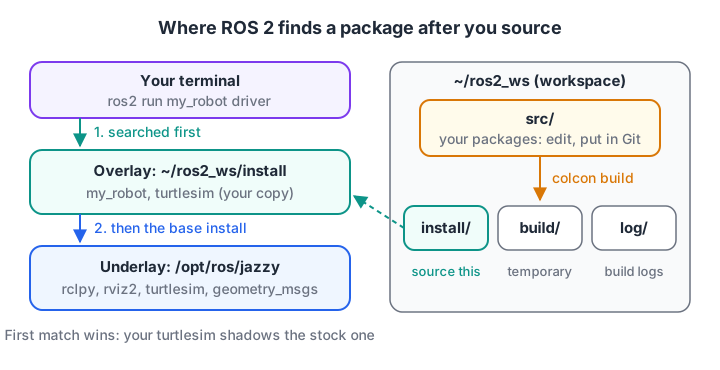
Sourcing stacks the layers. The last workspace you source is searched first, so its packages win.
- src holds your packages. It is the only folder you edit and put in Git.
- build holds intermediate files. Safe to delete.
- install holds built packages and the
setup.bashyou source. - log records every build.
The official tutorial recommends sourcing the overlay in a fresh terminal, after the underlay, rather than in the terminal where you just built.
Simulate how an overlay shadows a package
Sourcing sets environment variables such as AMENT_PREFIX_PATH, a list of install folders. When ROS looks for a package, it walks that list from the front and takes the first match. This toy model shows why your modified turtlesim wins over the stock one.
underlay = {"/opt/ros/jazzy": {"rclpy": "7.1", "turtlesim": "1.8", "geometry_msgs": "5.3"}}
overlay = {"/home/you/ros2_ws/install": {"turtlesim": "1.8-mine", "my_robot": "0.1"}}

def source(prefix_path, workspace):
    # setup.bash prepends the new workspace, so it is searched first
    return list(workspace) + prefix_path

def find_package(prefix_path, layers, name):
    for prefix in prefix_path:
        if name in layers[prefix]:
            return prefix, layers[prefix][name]
    return None, "package not found"

layers = {**underlay, **overlay}
path = source([], underlay)
print("only underlay sourced:", find_package(path, layers, "turtlesim"))
print("  my_robot ->", find_package(path, layers, "my_robot"))
path = source(path, overlay)
print("overlay sourced too:  ", find_package(path, layers, "turtlesim"))
print("  my_robot ->", find_package(path, layers, "my_robot"))
print("  rclpy    ->", find_package(path, layers, "rclpy"))
print("AMENT_PREFIX_PATH =", ":".join(path))
Before the overlay is sourced, my_robot simply does not exist for ROS, which is the classic error new users meet. After sourcing, the overlay's turtlesim shadows the stock one, while rclpy still comes from the underlay because the overlay does not contain it.
Quick check
You built a package, but ros2 run says "Package not found". What is the most likely cause?
Built packages are only visible to ROS after you source the overlay's setup script in the terminal you are using.
How to create and build your first workspace
- Make the folders and clone a known-good package (
ros_tutorials, which contains turtlesim) intosrc, using your distro's branch. - Run rosdep from the workspace root to install anything the packages need.
- Build with colcon from the workspace root, never from inside
src. - Open a new terminal, source the underlay, then source the overlay, and run a node.
mkdir -p ~/ros2_ws/src
cd ~/ros2_ws/src
git clone https://github.com/ros/ros_tutorials.git -b jazzy

cd ~/ros2_ws
rosdep install -i --from-path src --rosdistro jazzy -y
colcon build --symlink-install

# New terminal
source /opt/ros/jazzy/setup.bash
source ~/ros2_ws/install/setup.bash
ros2 run turtlesim turtlesim_node
--symlink-install links Python and launch files instead of copying them, so Python edits need no rebuild. --packages-select my_robot builds one package, and --packages-up-to my_robot adds its dependencies.
Your own packages go into the same src folder. ROS 2 basics shows ros2 pkg create and the setup.py entry points; the next lesson, describing a robot with URDF, adds a robot description package to this workspace.
How does colcon decide the build order?
A workspace often holds packages that depend on each other: a message package, a driver that uses those messages, a bringup package that launches the driver. colcon reads every package.xml and builds dependencies first.
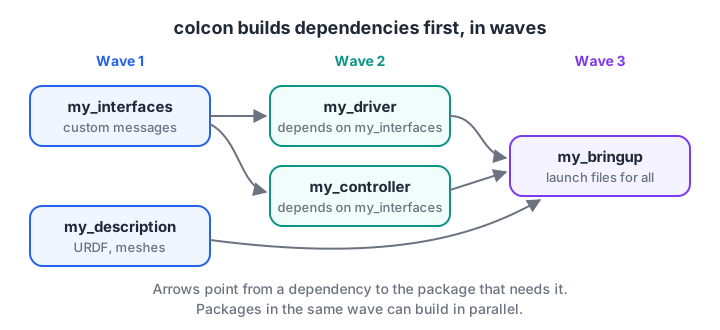
colcon builds packages with no unbuilt dependencies first, and packages on the same level in parallel.
Read dependencies out of package.xml
Each package declares what it needs with tags such as <depend>, <build_depend> and <exec_depend>. Here is a realistic package.xml for a small driver package.
<?xml version="1.0"?>
<package format="3">
  <name>my_driver</name>
  <version>0.1.0</version>
  <description>Serial bridge between ROS 2 and the robot's motor board</description>
  <maintainer email="you@example.com">You</maintainer>
  <license>Apache-2.0</license>
  <depend>rclpy</depend>
  <depend>geometry_msgs</depend>
  <depend>my_interfaces</depend>
  <exec_depend>python3-serial</exec_depend>
  <test_depend>python3-pytest</test_depend>
  <export>
    <build_type>ament_python</build_type>
  </export>
</package>
rosdep and colcon treat these names differently. Names of ROS packages in your workspace, such as my_interfaces, become build-order edges. Everything else is a rosdep key that maps to a system package, so python3-serial becomes the Ubuntu package that provides pyserial.
import xml.etree.ElementTree as ET

package_xml = """<package format="3"><name>my_driver</name>
  <depend>rclpy</depend><depend>geometry_msgs</depend><depend>my_interfaces</depend>
  <exec_depend>python3-serial</exec_depend><test_depend>python3-pytest</test_depend>
  <export><build_type>ament_python</build_type></export></package>"""

root = ET.fromstring(package_xml)
workspace_packages = {"my_interfaces", "my_description", "my_bringup"}
installed = {"rclpy", "geometry_msgs", "python3-pytest"}       # already on this machine

for tag in ("depend", "exec_depend", "test_depend"):
    for dep in root.iter(tag):
        name = dep.text
        if name in workspace_packages:
            where = "built from src first (colcon edge)"
        elif name in installed:
            where = "already installed"
        else:
            where = "rosdep will install it"
        print(f"{root.findtext('name')}: {tag:12} {name:15} -> {where}")
print("build type:", root.find("export/build_type").text)
Compute the build order yourself
Python's standard graphlib module does the same topological sort colcon does. Packages that become ready together could be built in parallel.
from graphlib import TopologicalSorter

deps = {                                   # package -> workspace packages it needs
    "my_interfaces": set(),
    "my_driver": {"my_interfaces"},
    "my_description": set(),
    "my_controller": {"my_interfaces"},
    "my_bringup": {"my_driver", "my_description", "my_controller"},
}
ts = TopologicalSorter(deps)
ts.prepare()
wave = 1
while ts.is_active():
    ready = sorted(ts.get_ready())         # everything whose deps are built
    print(f"wave {wave}: build in parallel -> {', '.join(ready)}")
    ts.done(*ready)
    wave += 1

deps["my_interfaces"] = {"my_bringup"}     # a careless circular dependency
try:
    list(TopologicalSorter(deps).static_order())
except Exception as e:
    print("colcon would refuse too:", type(e).__name__)
The last lines show why circular dependencies are fatal: no package in the loop can ever be built first. If colcon reports a cycle, move the shared messages into their own package.
Common ROS 2 installation and workspace mistakes
- Mixing distros. Sourcing Humble and Jazzy in one terminal, or cloning a
humblebranch into a Jazzy workspace, gives baffling errors. One distro per machine or container is simplest. - Forgetting to re-source after adding a package. New packages appear only after you source
install/setup.bashagain. - A Conda or virtualenv Python on the path. ROS 2 Jazzy's binaries are built against Ubuntu 24.04's system Python. Deactivate Conda before building, or colcon may pick the wrong interpreter.
- Two laptops controlling each other's robots. In a shared lab, nodes on the same network discover each other. Give each student a different
ROS_DOMAIN_ID, for exampleexport ROS_DOMAIN_ID=7.
If loops and conditions in these scripts still feel shaky, the shared for loop and if-else lessons are a quick refresher, and you can warm up your shell and Python logic on Debugshala Test.
Key takeaways
- Pick Ubuntu first: 24.04 goes with Jazzy, 26.04 with Lyrical. Kilted ends in December 2026.
- Install with the
ros2-apt-sourcepackage, thenros-dev-toolsandros-jazzy-desktop. /opt/ros/jazzyis the underlay; your workspace'sinstallfolder is an overlay searched first.- A workspace is
srcplus colcon'sbuild,installandlogfolders; onlysrcgoes in Git. - rosdep installs system dependencies; colcon builds workspace packages in dependency order.
FAQ
Which version of ROS 2 should a beginner install?
Install ROS 2 Jazzy Jalisco on Ubuntu 24.04. It is a long-term support release maintained until May 2029, and most tutorials, simulators and third-party packages support it. If you are starting on Ubuntu 26.04, install Lyrical Luth, the newest LTS from May 2026, with the same steps.
Can I install ROS 2 on Windows?
Yes. Jazzy publishes Windows binaries, but most learning material, rosdep and many community packages assume Ubuntu. For a course or self-study, running Ubuntu 24.04 inside WSL 2 on Windows is usually smoother, and RViz and Gazebo windows display through WSLg on Windows 11.
What is the difference between ros-jazzy-desktop and ros-jazzy-ros-base?
ros-jazzy-desktop includes the core libraries plus RViz, rqt, demos and tutorials, so it suits a development laptop. ros-jazzy-ros-base contains only the communication libraries, message packages and command-line tools, with no graphical tools, so it suits a Raspberry Pi or other robot computer.
Why do I need to source setup.bash in every terminal?
Sourcing sets environment variables, such as the package search path, only for the current shell session. A new terminal starts without them. Adding the underlay's source line to ~/.bashrc automates the base install, while sourcing the workspace by hand keeps you aware of which overlay is active.
Can I learn ROS 2 with guidance in Indore?
Yes. Debugshala's Old Palasia robotics course with ROS 2 basics introduces nodes and topics after you have worked with Arduino, ESP32, sensors and motors, and pairs them with Raspberry Pi and camera work. Classes are taught in English and Hindi, and a free demo class comes before any payment.
From the team behind this site
Go further with the Robotics Course at Debugshala
These tutorials are written by Debugshala, a training and placement institute at Old Palasia, Indore. The classroom course adds live mentoring, real projects and interview preparation.
- Offline classes at Old Palasia, Indore
- Free demo class before you pay
- Non-IT, fresher and year-gap friendly
- Placement assistance
700+ students placed · 200+ hiring partners · 4.9★ Google rating
